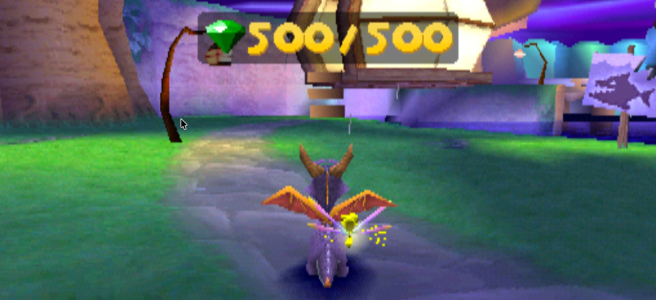
Spyro: Year of the Dragon on the PlayStation has a glitch in Spooky Swamp, where a gem can become impossible to collect and make it impossible to fully complete the game. This is described further in the Spyro Wiki:
Sometimes, in Spooky Swamp, there is a chance that one gem will totally vanish, and Sparx will not be able to track it down after completing Spider Town. If this happens, it will be impossible to get 100%, but one can still access Super Bonus Round with a cheat; however, the Sorceress can’t be fought at all. This is an unusual glitch, and there is no possible way to stop it, or knowing when it is going to happen.
This glitch is caused by killing one of the Mosquitoes for the first time over the water, without having Sparx. This causes the gem to fall into the water and become unretrievable.
Whilst working on a full completion playthrough of the game, my son encountered this glitch. The idea of him having to start the game all over again to get 100% completion felt pretty painful, so I dug into whether there was a way around it. My first thought was that there might be a save file editor that I could use to fix up the save – because we have a MemCard PRO it would have been straightforward to copy the save over to a computer for editing. However, there doesn’t seem to be a level editor available, and I didn’t feel like trying to reverse engineer the save game format.
Instead, I thought another plan would be simpler: open up the save file under emulation in PCSX-Redux, edit the game state to correct the number of gems, and then save the game before copying it back to the MemCard PRO so my son could continue on the real PlayStation. I didn’t see any GameShark / Action Replay codes that would work for the version we seem to be playing, so I figured out some appropriate changes, which are described here for anyone else using the same version.
Edits
The two edits that need to be made are (both 16-bit values):
- For 500 gems in Spooky Swamp, set
0x80071B20to0x1F4(500 in hex) - For 4000 gems in total, set
0x8006C7FBto0xFA0(4000 in hex)
The gem total value might need to be modified depending on the state of the game at the time – we happened to have 3999 gems, so 4000 would be the appropriate fixed value, but it will likely vary on a different save.
I’m not actually sure the total gem edit is strictly necessary either – it’s needed for the game to stay consistent if play continues after the edit, but I didn’t see evidence of it being stored in a save file – so it may be that the correct total would be recomputed after a save / load cycle anyway.
Version
The edits here have been used with a version of the game that looks like this:
$ sha256sum *

c3081998797fdf3a82829103924445fa823a4431561e0f1c394ee849f08a427f  \
    Spyro - Year of the Dragon (USA) (v1.1).bin
44bff8aecb2cc150553b6e4757420dee97e563effcd3e3b23d841fc664beb7d2  \
    Spyro - Year of the Dragon (USA) (v1.1).cue
Gameshark Codes
I haven’t tested these, but according to the descriptions of codes on the GameHacking.org Hacking PlayStation section, I think these should be usable to fix the glitch if an emulator is not available or it’s not convenient to copy the saves:
80071B20 01F4
8006C7FB 0FA0
I don’t think I’d enable these all the time – I’d probably just have them enabled to fix the glitch then save, and then turn them off again. As above, the 0FA0 value may need changing as appropriate for the value in your save file.
Video
This short video demonstrates the procedure – here I’ve already imported the memory card into PCSX-Redux, loaded up the save and opened the memory editor. I had to use the interpreted CPU to get past the title screen – dynarec seemed to get stuck at the title screen, but I’m using some really old random commit of PCSX-Redux that I built ages ago so it wasn’t too much of a concern.
 Graham Markall